Why Checksums Matter: How syncopio Verifies Every File
Hash algorithms explained, why dual checksums beat single-pass verification, and how syncopio verifies during transfer with zero extra passes.
TL;DR
Silent bit rot, network corruption, and truncated writes can produce files that exist but contain wrong data. Checksums are the only way to know for sure. syncopio computes checksums at source and destination during transfer — not as a separate pass — giving you verified integrity at wire speed.
You’ve just finished a 48-hour migration of 200TB across 50 million files. Everything looks good — file counts match, no errors in the log. But how do you know every file is intact? Silent bit rot, network corruption, storage firmware bugs, and truncated writes can all produce files that exist but contain wrong data. Checksums are the only way to know for sure.
What Is a Checksum?
A checksum (or hash) is a fixed-size value computed from file contents using a mathematical function. If even one bit of the file changes, the checksum changes completely. By computing checksums on both source and destination and comparing them, you can detect any data corruption.
Enter your email to read the full algorithm comparison and implementation details
We won't spam you. Unsubscribe any time.
Hash Algorithms Compared
Not all hash algorithms are equal. The trade-off is between speed and collision resistance (how hard it is to find two files with the same hash).
Algorithm
Speed (GB/s)*
Output Size
Collision Resistance
Use Case
MD5
~3.5
128 bit
Broken
Legacy systems only
SHA-256
~1.2
256 bit
Strong
Security, compliance
SHA-512
~1.5
512 bit
Strong
High-security environments
XXH3
~30+
64/128 bit
Non-cryptographic
Speed-first integrity
BLAKE3
~8+
256 bit
Strong
Modern replacement for SHA-256
*Approximate single-core throughput on modern x86 hardware. Actual speeds depend on CPU, memory, and implementation.
MD5: Legacy, Avoid for New Deployments
MD5 was the standard for file integrity for decades, and you’ll still find it in many tools (rsync, md5sum). It’s fast and produces compact 128-bit hashes. However, MD5 is cryptographically broken — it’s possible to create different files with the same MD5 hash. For migration integrity checking (not security), MD5 is still functional, but newer options are better in every way.
SHA-256: The Gold Standard for Compliance
SHA-256 is the default choice when compliance or security matters. It’s part of the SHA-2 family, has no known practical attacks, and is required by many regulatory frameworks. The trade-off is speed — SHA-256 is roughly 3x slower than MD5 on the same hardware.
XXH3: When Speed Is Everything
XXH3 is a non-cryptographic hash that runs at 30+ GB/s — limited by memory bandwidth, not CPU. For migration integrity checking where you need speed and aren’t concerned about adversarial collision attacks, XXH3 is excellent.
BLAKE3: The Modern Choice
BLAKE3 combines SHA-256-class security with near-XXH3 speed. It’s parallelizable, produces 256-bit hashes, and is quickly becoming the modern default for file integrity. If you’re choosing a single algorithm for integrity verification, BLAKE3 is hard to beat.
Why Traditional Tools Fall Short
rsync: Checksum as an Afterthought
rsync can verify with checksums, but it’s a separate pass:
# Transfer firstrsync -av /source/ /dest/# Then verify (reads everything again)rsync -avc /source/ /dest/
This means:
Double the I/O — you read every file twice (once to copy, once to verify)
Double the time — verification takes as long as the transfer
Race condition — files can change between transfer and verification
For a 200TB migration, a separate verification pass adds another 48 hours. Most admins skip it.
Robocopy: No Checksums at All
Robocopy has no built-in checksum capability. You can compare file sizes and timestamps, but these don’t detect silent corruption. Adding verification means writing PowerShell scripts with Get-FileHash:
rclone supports --checksum for comparison, but similar to rsync, it’s a separate operation that doubles I/O.
The Dual-Checksum Approach
The best approach for migration integrity uses two checksums:
Fast hash (XXH3 or CRC32) — computed during transfer for real-time integrity
Strong hash (SHA-256 or BLAKE3) — for compliance evidence and long-term verification
Why both?
The fast hash catches transfer corruption immediately — if the hash doesn’t match after network transfer, the file is retried before moving on
The strong hash provides cryptographic evidence that can’t be spoofed, meeting compliance requirements for audit trails
Think of it like shipping
The fast hash is like checking that a package arrived intact (quick visual inspection). The strong hash is like verifying the serial numbers inside match the shipping manifest (takes longer but is legally defensible).
How syncopio Verifies Every File
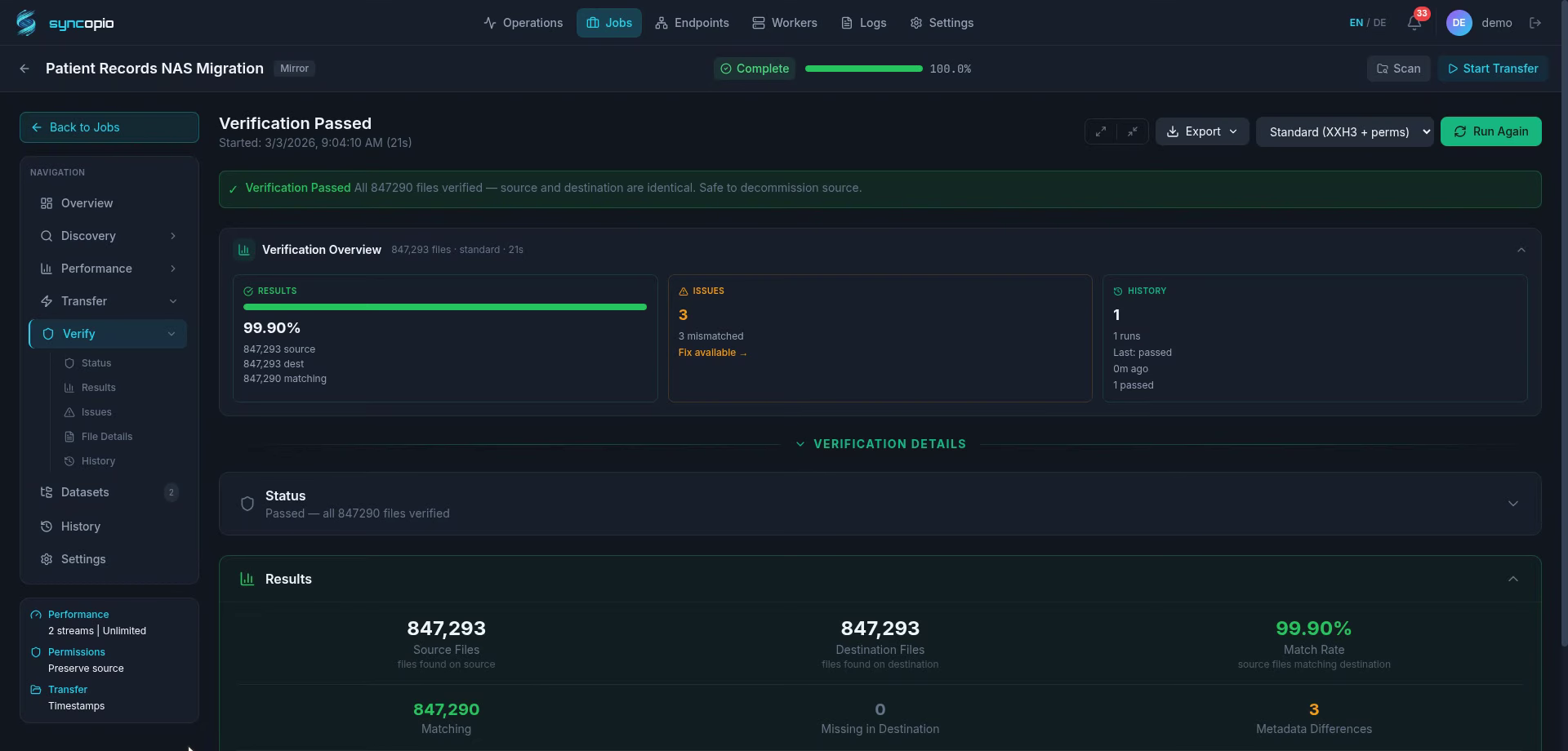
syncopio takes a fundamentally different approach from CLI tools: verification happens during transfer, not after.
During Transfer
Source read — the worker reads the file from the source filesystem
Hash computation — as bytes stream through memory, checksums are computed in parallel
Destination write — bytes are written to the destination
Immediate comparison — the computed hash is compared against the source hash
No second pass. No double I/O. No race conditions.
The Result
Approach
I/O Passes
Total Time (200TB)
Integrity Confidence
rsync (no verify)
1
~48 hours
None
rsync + checksum verify
2
~96 hours
High
Robocopy (no verify)
1
~48 hours
None
syncopio (verify during transfer)
1
~48 hours
High
syncopio gives you the same integrity guarantee as rsync’s two-pass approach in half the time.
After transfer, syncopio generates verification reports suitable for compliance audits:
Per-file checksums — source hash, destination hash, match status
Transfer metadata — timestamps, byte counts, worker ID
Summary statistics — total files, verified files, any mismatches
Export formats — PDF for auditors, CSV for analysis, Excel for stakeholders
syncopio advantage
syncopio’s built-in verification eliminates the “did it actually copy correctly?” anxiety that plagues every migration. No second pass, no manual verification scripts, no hoping for the best. See all features or request a demo.
Best Practices for Migration Verification
Regardless of what tool you use:
Always verify — “no errors in the log” isn’t the same as “data is intact”
Use checksums, not just size+timestamp — matching sizes don’t catch corruption
Verify on the destination — don’t trust the transfer tool’s self-report; read back from the destination
Keep verification evidence — compliance auditors will ask for proof
Plan for the verification time — if you’re doing a separate pass, budget for it in your migration timeline